
[해동아이디어팩토리] 출입 및 안전교육(신규/정기) 이수 안내 / Access Renewal & Safety Training Certificate Submission
-
작성일
-
조회 수
1,851 -
첨부파일
안전한 이용 환경 조성을 위해 출입 규정이 변경되었습니다.
해동아이디어팩토리 이용을 위해 매년 출입 권한 갱신이 필수이오니,
아래 안내에 따라 해당되는 수료증을 제출해 주시기 바랍니다.
1. 신분별 교육 이수 및 확인 방법
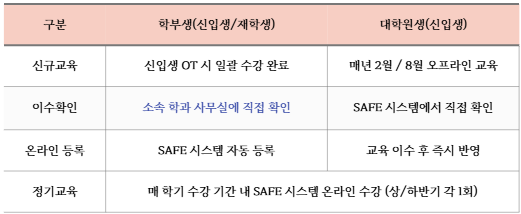
⚠️ 학부생 주의사항
: 자동 등록 기간 전까지는 시스템 출력이 불가능하므로, 반드시 학과 사무실을 통해 이수 확인증을
확보하여 선 제출해야 출입 권한이 부여됩니다.
2. 출입 권한 유지를 위한 필수 수료증 (3가지)
본인의 상황에 맞춰 다음 수료증들을 제출해야 권한이 유지됩니다.
A, B 항목은 한 번 제출하면 다시 제출하실 필요가 없습니다. (분실 시 재수강 필요)
**C 항목(정기 교육)**은 반드시 매 학기마다 갱신하여 제출해야 합니다. (매년 갱신 필수!!)
3. 수료증 다운로드 및 제출 방법
[A] 메이커 양성과정 (eTL)
제출 양식: 이름_학번_메이커양성과정
제출 양식: 이름_학번_메이커양성과정
- 수료증 다운로드 방법
: SAFE 홈페이지 ➔ 안전교육 ➔ 나의 강의실 ➔ 수강한 안전강의 선택 ➔ [제출용] 출력 ➔ PDF 다운
: SAFE 홈페이지 ➔ 안전교육 ➔ 나의 강의실 ➔ 수강한 안전강의 선택 ➔ [제출용] 출력 ➔ PDF 다운
링크: https://forms.gle/RzBuiCooq4nfqZoLA
링크:
[B] 신규 안전교육 (SAFE)
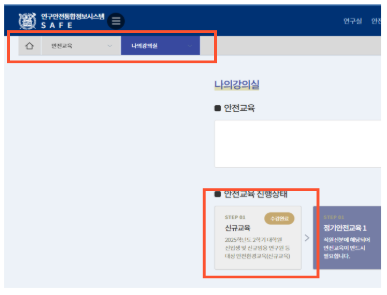
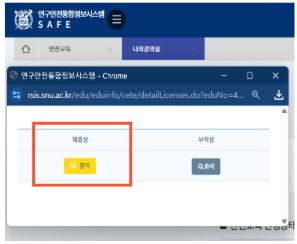
[ 제출 서류 예시 ]
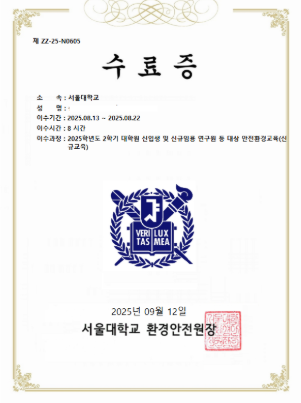
학부생: 시스템 등록 전까지는 학과 사무실에서 발급받은 확인증 업로드
수료증 다운로드 방법
: SAFE 홈페이지 ➔ 안전교육 ➔ 나의 강의실 ➔ 수강한 안전강의 선택 ➔ [제출용] 출력 ➔ PDF 다운
제출 양식: 이름_학번_연구실 안전교육(신규)
링크: https://forms.gle/o2zbLtCUmsCXqLv7A
학부생: 시스템 등록 전까지는 학과 사무실에서 발급받은 확인증 업로드
수료증 다운로드 방법
: SAFE 홈페이지 ➔ 안전교육 ➔ 나의 강의실 ➔ 수강한 안전강의 선택 ➔ [제출용] 출력 ➔ PDF 다운
제출 양식: 이름_학번_연구실 안전교육(신규)
링크:
[C] 정기 안전교육 (SAFE)
경로: [신규 교육]과 동일하게 SAFE 시스템에서 '정기안전교육' 수료증 다운로드
제출 양식: 이름_학번_연구실 안전교육(정기)
링크: https://forms.gle/6pUcEbyxJidJNBjL7
경로: [신규 교육]과 동일하게 SAFE 시스템에서 '정기안전교육' 수료증 다운로드
제출 양식: 이름_학번_연구실 안전교육(정기)
링크:
Gemini의 응답
[FAQ] 자주 묻는 질문 및 유의사항
Q. 신입생 OT 때 교육을 들었는데 SAFE 시스템에 이수 내역이 없다고 나와요.
A: 학부생의 경우 시스템 일괄 등록이 5월 이후에 진행되기 때문입니다.
그 전까지는 소속 학과 사무실을 통해 이수 여부를 확인받고, 발급받은 확인증을
먼저 제출해 주셔야 출입 권한이 부여됩니다.
Q. 메이커 양성과정 수료증을 분실했습니다.
A: eTL의 [비정규 강좌] 메뉴에서 언제든지 재발급 및 PDF 다운로드가 가능합니다.
Q. 정기 안전교육을 기간 내에 이수하지 못하면 어떻게 되나요?
A: 관련 법령 및 교내 규정에 따라 연구실(해동아이디어팩토리 포함) 출입이 즉시 제한됩니다.
반드시 상/하반기 정해진 기간 내에 이수 후 수료증을 갱신해 주시기 바랍니다.
Q. 수료증 파일명 양식을 꼭 지켜야 하나요?
A: 네, 수많은 인원의 데이터를 관리하므로 [성함_학번_수료증명] 양식을 지키지 않을 경우
확인이 누락되어 출입 권한 갱신이 지연될 수 있습니다.
Q. 신입생 OT 때 교육을 들었는데 SAFE 시스템에 이수 내역이 없다고 나와요.
A: 학부생의 경우 시스템 일괄 등록이 5월 이후에 진행되기 때문입니다.
그 전까지는 소속 학과 사무실을 통해 이수 여부를 확인받고, 발급받은 확인증을
먼저 제출해 주셔야 출입 권한이 부여됩니다.
Q. 메이커 양성과정 수료증을 분실했습니다.
A: eTL의 [비정규 강좌] 메뉴에서 언제든지 재발급 및 PDF 다운로드가 가능합니다.
Q. 정기 안전교육을 기간 내에 이수하지 못하면 어떻게 되나요?
A: 관련 법령 및 교내 규정에 따라 연구실(해동아이디어팩토리 포함) 출입이 즉시 제한됩니다.
반드시 상/하반기 정해진 기간 내에 이수 후 수료증을 갱신해 주시기 바랍니다.
Q. 수료증 파일명 양식을 꼭 지켜야 하나요?
A: 네, 수많은 인원의 데이터를 관리하므로 [성함_학번_수료증명] 양식을 지키지 않을 경우
확인이 누락되어 출입 권한 갱신이 지연될 수 있습니다.
문의처 (Inquiry)
안내된 내용 외에 추가로 궁금하신 사항은 아래 채널로 문의해 주시기 바랍니다.
카카오톡 채널: [@snuif] (채널 추가 후 1:1 채팅 문의)
행정실 전화: 02-880-7399
상담 가능 시간: 평일 09:00 ~ 18:00 (점심시간 12:00 ~ 13:00 제외)
여러분의 안전한 창작 활동을 위해 적극적인 협조 부탁드립니다. 감사합니다.
---------------------------------------------------------------------------------------------------------------------------------------------------------------------------------------------------------------------------------------------------------------------------------------------------------------------------------------------------------------------------------------------------[Notice] Access Renewal & Safety Training Certificate Submission
안내된 내용 외에 추가로 궁금하신 사항은 아래 채널로 문의해 주시기 바랍니다.
카카오톡 채널: [@snuif] (채널 추가 후 1:1 채팅 문의)
행정실 전화: 02-880-7399
상담 가능 시간: 평일 09:00 ~ 18:00 (점심시간 12:00 ~ 13:00 제외)
여러분의 안전한 창작 활동을 위해 적극적인 협조 부탁드립니다. 감사합니다.
---------------------------------------------------------------------------------------------------------------------------------------------------------------------------------------------------------------------------------------------------------------------------------------------------------------------------------------------------------------------------------------------------[Notice] Access Renewal & Safety Training Certificate Submission
To ensure a safe environment, access regulations for the Haedong Idea Factory
have been updated.
Annual access renewal is mandatory.
Please review the following instructions and submit the required certificates
accordingly.
To ensure a safe environment, access regulations for the Haedong Idea Factory
have been updated.
Annual access renewal is mandatory.
Please review the following instructions and submit the required certificates
accordingly.
1. Safety Training Methods by Student Status
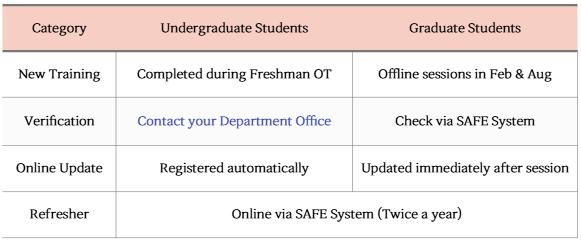
⚠️ Special Note for Undergraduates
Since your training status will not appear on the SAFE system until May,
you MUST obtain a "Confirmation of Completion" from your Department
Office and submit it in advance to gain access.
⚠️ Special Note for Undergraduates
Since your training status will not appear on the SAFE system until May,
you MUST obtain a "Confirmation of Completion" from your Department
Office and submit it in advance to gain access.
2. Mandatory Certificates for Access (3 Types)
All three requirements must be met and submitted to maintain your access rights.
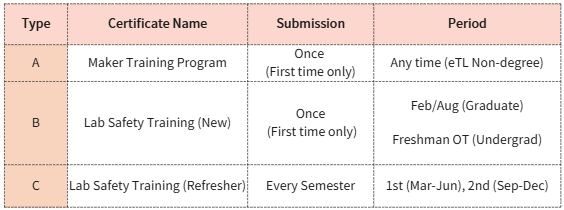
Type A & B: Only need to be submitted once
(unless your status changes, e.g., Undergrad → Graduate).
Type C (Refresher): Must be renewed every semester.
(Annual renewal is mandatory!!)
All three requirements must be met and submitted to maintain your access rights.
Type A & B: Only need to be submitted once
(unless your status changes, e.g., Undergrad → Graduate).Type C (Refresher): Must be renewed every semester.
(Annual renewal is mandatory!!)
3. How to Download and Submit Certificates
[A] Maker Training Program (eTL)
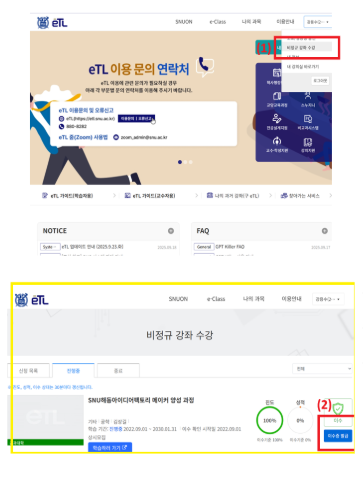
Path: Log in to eTL ➔ Non-degree Course ➔ 'Maker Training Program' |
➔ Issue Certificate ➔ Save as PDF
File Format: Name_Student ID_Maker Training
Path: Log in to eTL ➔ Non-degree Course ➔ 'Maker Training Program' |
➔ Issue Certificate ➔ Save as PDFFile Format: Name_Student ID_Maker Training
[B] Lab Safety Training - New (SAFE)
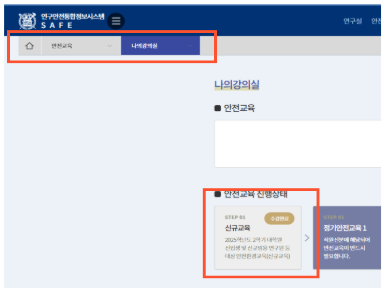
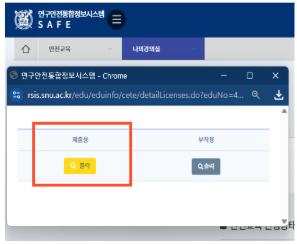
Path: Log in to SAFE ➔ Safety Training ➔ My Classroom ➔ Select Course
➔ [For Submission] Print ➔ Save as PDF
Undergraduates: Upload the confirmation document issued by your Department
Office until May.
File Format: Name_Student ID_Lab Safety(New)
Path: Log in to SAFE ➔ Safety Training ➔ My Classroom ➔ Select Course
➔ [For Submission] Print ➔ Save as PDFUndergraduates: Upload the confirmation document issued by your Department
Office until May.File Format: Name_Student ID_Lab Safety(New)
[C] Lab Safety Training - Refresher (SAFE)
Path: Same as [New Training], download the 'Refresher Training' certificate from
the SAFE system.
File Format: Name_Student ID_Lab Safety(Refresher)
Path: Same as [New Training], download the 'Refresher Training' certificate from
the SAFE system.File Format: Name_Student ID_Lab Safety(Refresher)
[FAQ] Frequently Asked Questions
Q. I completed the training at OT, but it's not on the SAFE system.
A: Undergraduate records are updated after May. Please get a temporary
confirmation from your Department Office and submit it first.
Q. I lost my Maker Training certificate.
A: You can re-download it from the [eTL] "Non-degree" course menu at any
time.
Q. What happens if I don't complete the Refresher Training on time?
A: Access to the Lab (including Haedong Idea Factory) will be immediately
restricted per university regulations. Please renew it every semester.
Q. Do I have to follow the file name format?
A: Yes. Failure to use the [Name_ID_Certificate] format may cause delays in
verifying your access renewal.
Q. I completed the training at OT, but it's not on the SAFE system.
A: Undergraduate records are updated after May. Please get a temporary
confirmation from your Department Office and submit it first.
Q. I lost my Maker Training certificate.
A: You can re-download it from the [eTL] "Non-degree" course menu at any
time.
Q. What happens if I don't complete the Refresher Training on time?
A: Access to the Lab (including Haedong Idea Factory) will be immediately
restricted per university regulations. Please renew it every semester.
Q. Do I have to follow the file name format?
A: Yes. Failure to use the [Name_ID_Certificate] format may cause delays in
verifying your access renewal.
Inquiry
For further inquiries, please contact us via:
KakaoTalk Channel: [@snuif] (Add channel for 1:1 chat)
Office Phone: 02-880-7399
Service Hours: Weekdays 09:00 ~ 18:00 (Lunch break: 12:00 ~ 13:00)
Thank you for your cooperation in maintaining a safe creative environment.
For further inquiries, please contact us via:
KakaoTalk Channel: [@snuif] (Add channel for 1:1 chat)
Office Phone: 02-880-7399
Service Hours: Weekdays 09:00 ~ 18:00 (Lunch break: 12:00 ~ 13:00)
Thank you for your cooperation in maintaining a safe creative environment.

